For photographers
My Camera Can’t Send Photos by Itself. Can I Still Share Them Live?
Snapseek · · 3 min read

Kabir has shot weddings for eight years on a camera he loves. Last month, at a sangeet in Jaipur, a guest asked him, "Can we see the photos tonight? My friend's photographer did it live."
Kabir smiled and said "soon". Then he went home and wondered if his trusty old camera could ever do that.
The camera that stays quiet
Some cameras can send photos on their own, straight to the internet, the moment you click. They have a setting called FTP, which is simply the setting that lets a camera send photos by itself. To send straight to Snapseek, the camera needs the secure version, FTPS.
The secure version mostly lives in newer, higher-end bodies. Plenty of working photographers in India shoot on cameras that have only plain FTP, or no FTP at all, or Wi-Fi so moody you wouldn't trust it at a wedding.
So is live sharing only for people with the fanciest cameras? Not at all. There are four roads, and one of them fits almost any kit.
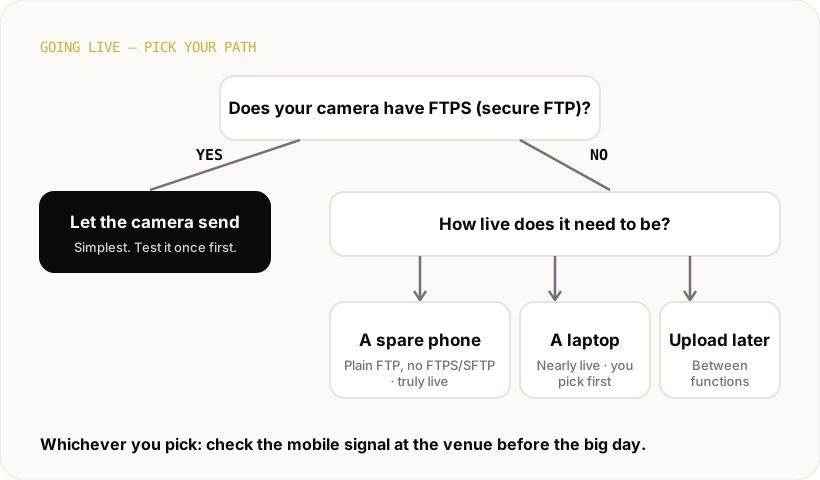
Road one: your camera might already know how
Before buying anything, open your camera's network menu and look for FTP with an FTPS, SSL or TLS option. Many photographers own this feature and have simply never switched it on.
If you find it, don't try it for the first time at a wedding. Do a test run at home or at a small shoot. With Snapseek, the event page shows you exactly what to type into the camera, so there's no guessing.
Road two: a spare phone in your pocket
This is the road for cameras that have plain FTP but no FTPS/SFTP. Your camera sends over plain FTP to a spare Android phone right beside it, by hotspot, Wi-Fi or a USB cable. The phone then sends the photos up securely over mobile data.
The phone does the secure talking your camera can't. If your camera has no FTP at all, skip to roads three and four. Snapseek Relay is the app built for this. It's still in beta and Android only, so it's wise to test it before a big day.
Two small things to remember. The phone needs charge, so carry a power bank. And it can only be as fast as the mobile signal at the venue.
Road three: a laptop on a table
Some studios like to keep a laptop at the venue. Cards get copied into a folder, and that folder syncs up by itself.
It's steady, and someone can pick the best photos before guests see them. The catch: one person stays at that table, and "live" depends on how often cards come off the cameras.
Road four: upload between functions
This one isn't live at all, and that's completely fine. Shoot the haldi, upload the best ones during lunch from your phone or laptop. By evening, guests are finding their haldi photos.
Compared to waiting three weeks, it still feels like magic to the family. It also saves you hours of sending links later, the hidden job after every wedding.
The one thing every road needs
Whichever road you pick, the venue matters as much as the gear. Basement banquet halls with no signal. Farmhouses at the edge of nowhere. These can slow anyone down.
The photographers who do live sharing well do one boring thing: they check the mobile signal during the venue visit, not on the wedding day. If it's weak, they find the corner of the hall where it isn't.
And once photos are flowing, guests stop asking for them over chat, which spares everyone the blurry forward problem.
Kabir's next sangeet
Three weeks later, Kabir is at another sangeet. His old camera is on his shoulder, a spare phone is in his pocket (his camera turned out to have plain FTP after all), and a QR code sits on every table.
Guests scan it, take one selfie, and find the photos he took minutes ago. Someone at the next table squeals at her phone, just like that guest in Jaipur would have. Kabir didn't change cameras. He just found a different road.
If you're curious how this looks for your own setup, the Snapseek page for photographers walks through it gently.